FoxTerm for macOS: The Only Remote Server Tool You'll Ever Need
One app. SSH terminal, SFTP file manager, Metal-accelerated VNC, and Docker management. Zero telemetry. One purchase for macOS and iOS. Here's why FoxTerm replaces your entire remote toolbox.
Every developer's desktop eventually looks the same: a terminal emulator here, an SFTP client there, a VNC viewer somewhere else, a Docker dashboard in yet another window. Four apps, four different UIs, four separate licenses, and a dozen tabs of context-switching every time you touch a remote server.
FoxTerm for macOS collapses all of that into one native application. SSH terminal, SFTP file manager, Metal-accelerated VNC desktop, and Docker/Podman management — unified under a single interface, with zero telemetry and one purchase that covers both macOS and iOS.
This is not another Electron wrapper. This is a ground-up native build for Apple silicon.
High-Performance SSH Terminal with Real-Time System Monitoring
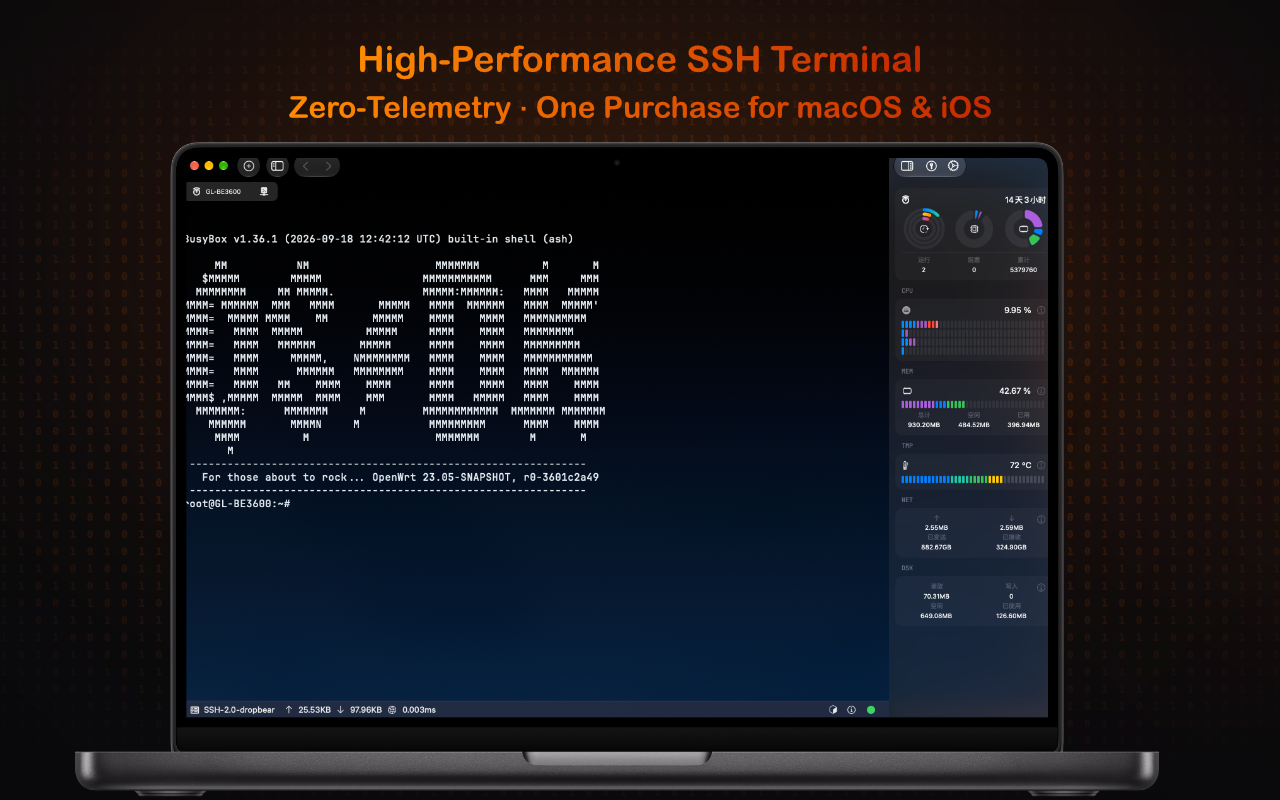
The terminal is the heart of any remote workflow, and FoxTerm's SSH engine is built for speed. Powered by the Ghostty terminal engine, it delivers GPU-accelerated rendering at 120fps on ProMotion displays — the kind of smoothness you feel before you measure it.
But what sets FoxTerm apart is the integrated system monitoring sidebar. While you work in your terminal, a live dashboard tracks:
- CPU usage with per-core breakdown
- Memory allocation and swap pressure
- Temperature sensors across all cores
- Network throughput with upload/download separation
- Disk I/O with read/write metrics
No more htop in a split pane. No more SSH-ing into a second session just to check load. The sidebar pulls metrics over the same SSH connection using lightweight system calls, so there's zero additional latency or resource cost on the remote host.
The terminal itself supports full ANSI 256-color and true-color output, ligatures, custom keybindings, and seamless copy-paste with the macOS system clipboard. It runs OpenWrt, Ubuntu, Alpine, RHEL — anything with an SSH daemon.
SFTP File Manager: Your Server's Filesystem, Native Feel
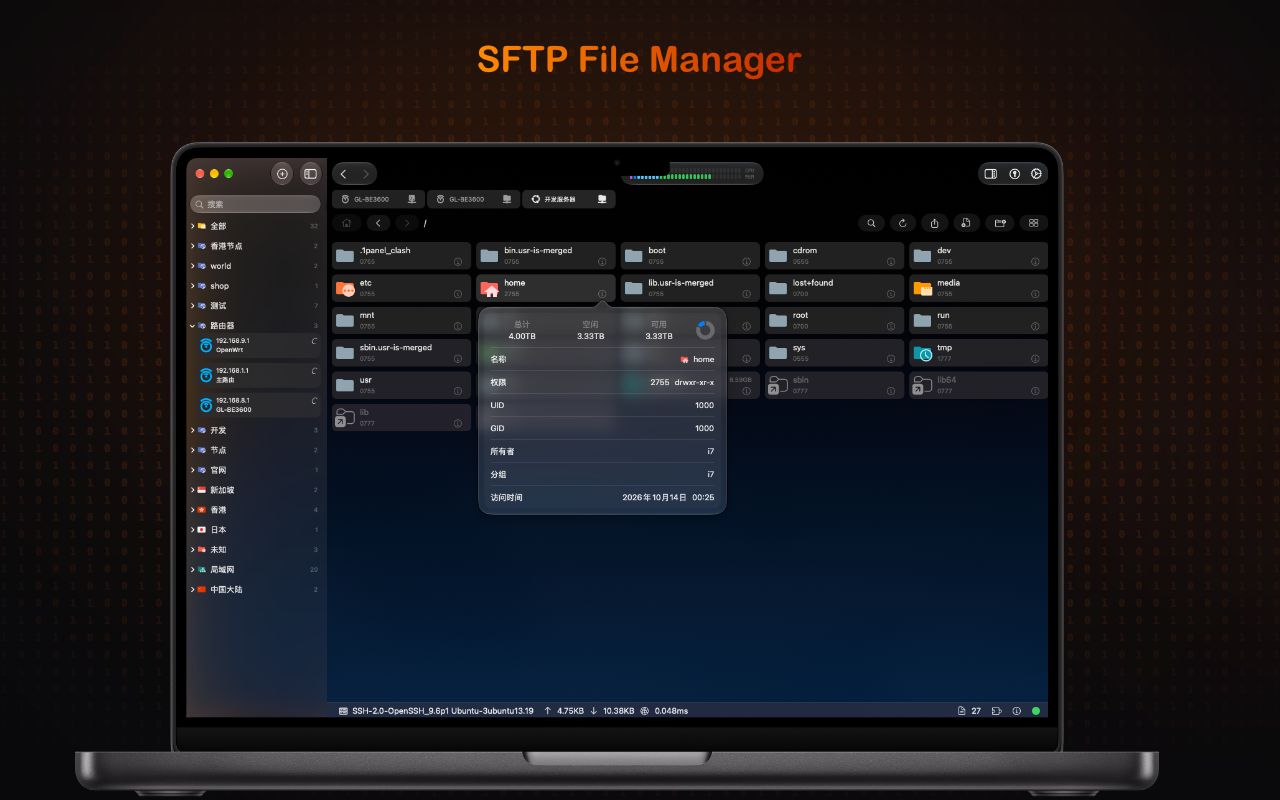
Browsing remote files shouldn't require a separate application. FoxTerm's SFTP file manager gives you a native macOS file browser experience against any SSH server.
Key capabilities:
- Tree-based navigation with grouped connections — organize servers by environment (production, staging, development) or geography
- Detailed file inspection — permissions, UID/GID, owner, group, and timestamps at a glance
- Drag-and-drop transfers between local and remote filesystems
- Multi-protocol support — works with OpenSSH, Dropbear, and any SFTP-compatible server
- Instant file stats — total, used, and available disk space displayed inline
The file manager shares the same SSH connection as your terminal session. Switch between terminal and SFTP without re-authenticating, without opening a new connection, without losing context. When you edit a remote file, it opens in your preferred local editor and syncs back on save.
For teams managing dozens of servers across multiple regions, the grouped sidebar becomes indispensable. Hong Kong nodes, Singapore clusters, Japan instances, US-East production — all organized, all one click away.
Metal-Accelerated VNC Desktop: Remote GUI at Native Frame Rates
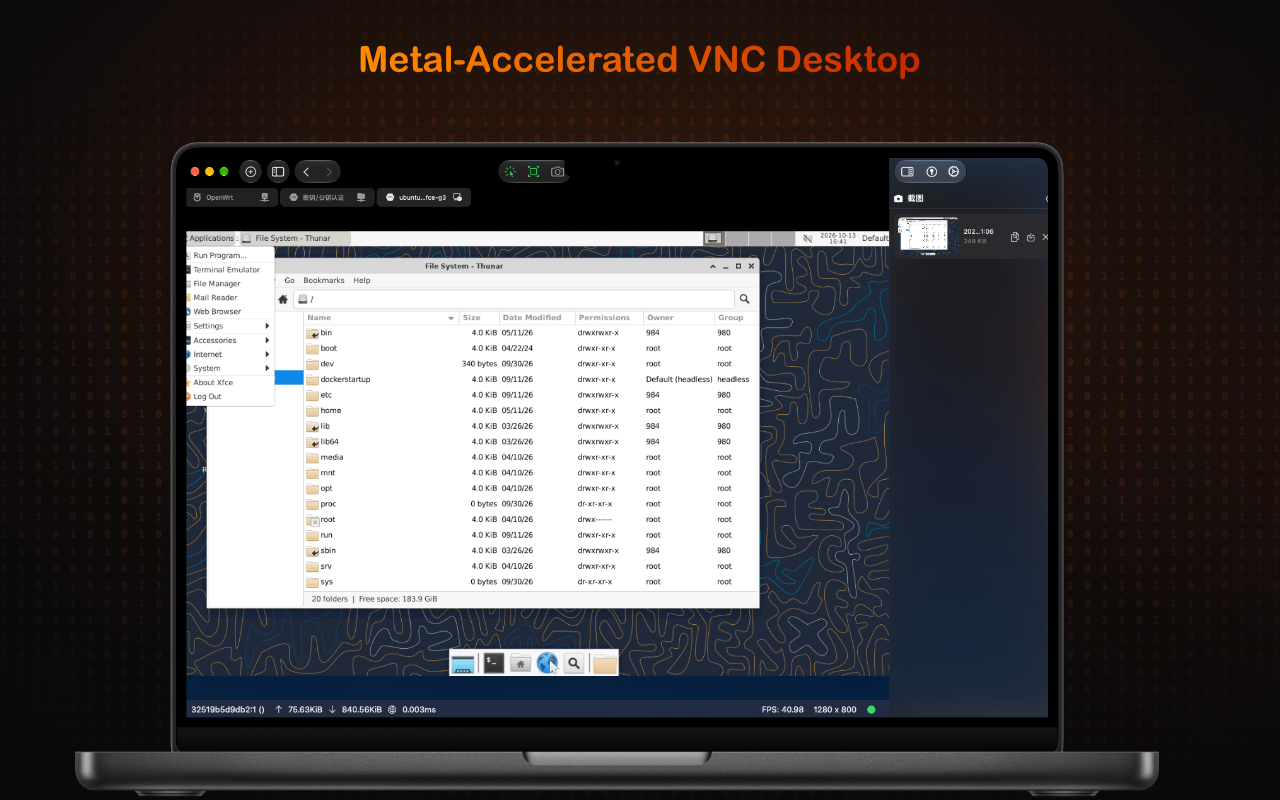
Sometimes you need a full desktop, not just a terminal. FoxTerm's VNC client is built on Apple's Metal graphics framework, delivering hardware-accelerated remote desktop rendering that traditional VNC clients simply cannot match.
The difference is immediately visible:
- 40+ FPS on a 1280×800 remote desktop, even over moderate-latency connections
- H.264-style compression via efficient frame differencing — only changed pixels travel over the wire
- Metal shader pipeline for decoding and display, bypassing CPU bottlenecks entirely
- Full clipboard integration — copy text and images between local and remote desktops
The VNC viewer supports XFCE, GNOME, KDE, and any VNC-compatible desktop environment. Whether you're managing a headless Ubuntu server with a lightweight XFCE session or administering a full GNOME workstation, the experience feels like a local window.
The status bar shows real-time metrics: current FPS, resolution, bandwidth usage, and connection latency. You always know exactly how your remote session is performing.
Docker & Podman Management: Container Ops Without Docker Desktop
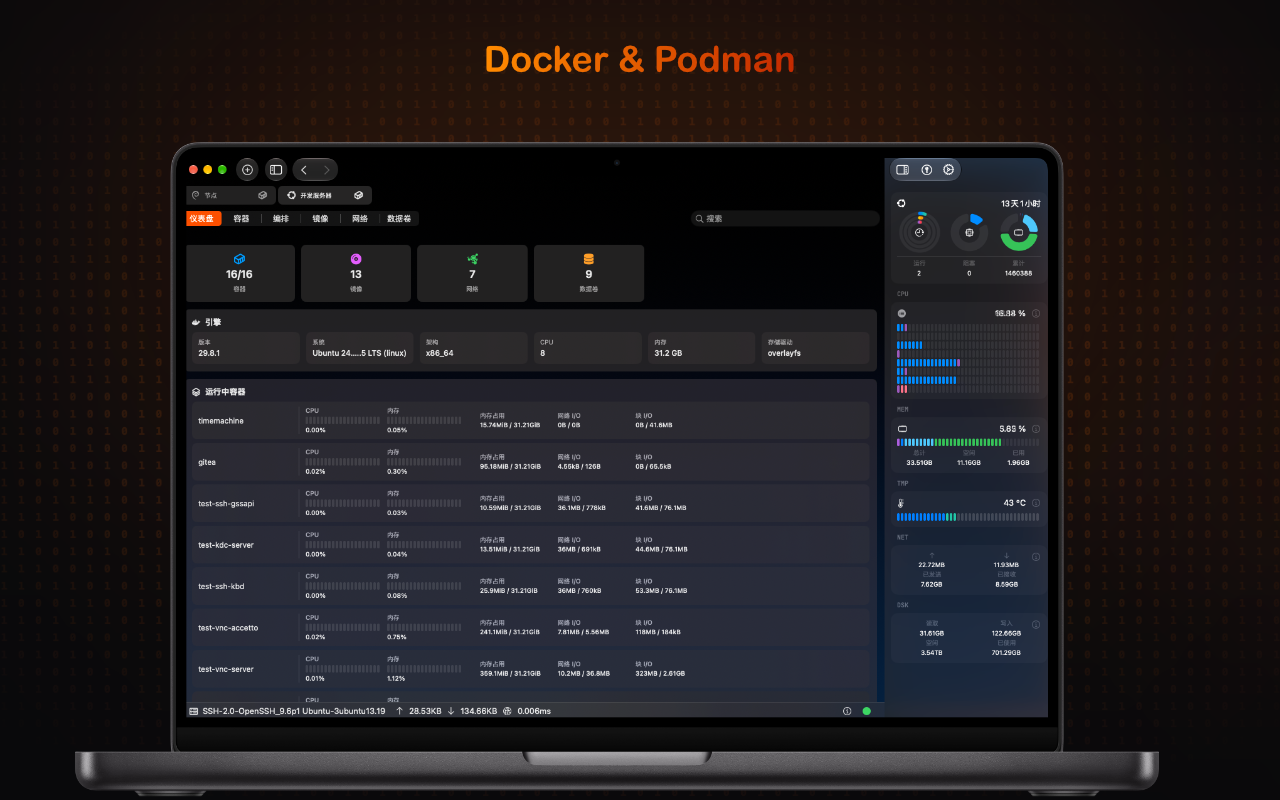
Managing containers on remote servers typically means SSH-ing in and typing docker ps over and over. FoxTerm brings container management into a visual dashboard that works with both Docker and Podman.
The dashboard provides:
- Cluster overview — total containers, volumes, networks, and images at a glance
- Engine details — version, OS, architecture, CPU count, and memory allocation
- Per-container metrics — CPU%, memory usage, network I/O, and disk I/O with live sparkline graphs
- Tabbed interface — switch between containers, compose, images, networks, and data volumes
- Real-time system monitoring — the same sidebar from the SSH terminal, now showing the Docker host's resource utilization
Whether you're running Docker 24.x LTS on Ubuntu or Podman with Quadlet services, FoxTerm connects over SSH and speaks the native API. No exposed TCP ports, no Docker Desktop license, no cloud dependency. Your containers stay on your infrastructure, managed from your Mac.
The container list shows everything: timemachine backups, Gitea instances, SSH gateways, KDC servers, VNC servers — each with live resource metrics updating in real time.
One App, Zero Telemetry, One Purchase
Every feature above runs in a single application. No plugin ecosystem to manage, no compatibility matrix between tools, no conflicting keyboard shortcuts between your terminal and your file manager.
More importantly: FoxTerm sends zero telemetry. No analytics, no crash reports to third parties, no usage tracking, no account required. Your server credentials, connection logs, and workflow patterns never leave your machine. This isn't a marketing claim — it's an architectural guarantee. The app has no network calls beyond the SSH/VNC connections you explicitly initiate.
The pricing is straightforward — one purchase covers both macOS and iOS. No per-seat licensing, no enterprise tiers, no feature gates. Every feature described above is included in every license.
Built for Apple Silicon, Not Ported to It
FoxTerm was not an Electron app wrapped in a native shell. It was not a Java application running on the JVM. It was built from day one with:
- Swift for the application layer
- Metal for GPU-accelerated rendering (terminal and VNC)
- Secure Enclave integration for SSH key storage
- Native macOS UI — window management, tabbing, split views, and keyboard shortcuts that match system conventions
- iOS parity — the same codebase adapts to touch input and smaller screens without compromise
The result is an app that launches in under a second, uses a fraction of the memory of Electron-based alternatives, and renders at the full refresh rate of your display.
Who Is FoxTerm For?
- DevOps engineers managing fleets of servers across multiple cloud providers
- System administrators who need SSH, file transfer, and remote desktop in one workflow
- Full-stack developers running Docker containers on remote build servers
- Security-conscious professionals who refuse to use tools that phone home
- Apple ecosystem users who want the same tool on Mac, iPad, and iPhone
If you currently have Terminal.app (or iTerm2), FileZilla, RealVNC, and Portainer open at the same time — FoxTerm replaces all four.
Get Started
FoxTerm is available on the Mac App Store and at foxterm.app. Download the trial, connect to your first server, and see what a unified remote workflow feels like.